
It happens, a lot, you provision a VM, and find out later, it would be nice if the service running on it had more space. Well, here’s the skinny.
Resize Hard Disk
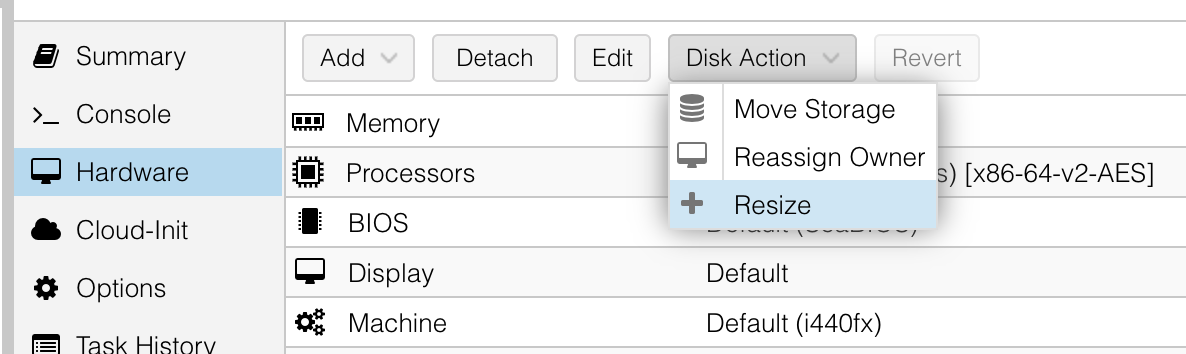
We will presume you know how to associate the Hard Disk that is associated to the /dev/sdx you are wanting to increase. Under the hardware settings for the Virtual Machine, select that Hard Disk and in the Disk Action dropdown menu above, click Resize.
A window will pop up and will ask you how much to increment the disk in GiB. This is a delta, so if you have 10GB and want to increase it to 30GB, you would type in 20 and click Resize Disk.
This will reflect in the Hard Disk’s description with size={new expanded size}
Connect to VM and determine dev name of the disk and partition you want to expand
$ lsblk
NAME              MAJ:MIN RM  SIZE TYPE MOUNTPOINTS
sda                 8:0    0   30G disk
└─sda1              8:1    0    1M part
└─sda2              8:2    0    2G part /boot
└─sda3              8:3    0    8G part
  └─ubuntu--vg-ubuntu--lv 252:0 0 8G lvm /
In this example, we see sda is resized to 30G and we want to use that free space in sda3.
Extend the partition
$ sudo growpart /dev/sda 3Update LVM of volume change
$ sudo pvresize /dev/sda3
$ sudo lvextend -l +100%FREE /dev/mapper/ubuntu--vg-ubuntu--lv
It’s nice to use +100%FREE as it will take every block from the disk volume
Resize the ext4 filesystem to address new lvm space
$ sudo resize2fs /dev/mapper/ubuntu--vg-ubuntu--lv